In today’s digital landscape, visual content reigns supreme. We’ve seen firsthand how powerful images can transform a brand’s online presence. That’s where Adobe Stock Images comes into play, offering a vast library of high-quality visuals for creators and businesses alike.
We’ll explore how Adobe Stock Images has revolutionized the way we access and use stock photography. From its seamless integration with Creative Cloud applications to its diverse range of content, this platform has become an indispensable tool for designers, marketers, and content creators. Join us as we delve into the features and benefits that make Adobe Stock Images a game-changer in the world of visual content.
Key Takeaways
- Adobe Stock offers a vast library of high-quality images, videos, and assets, seamlessly integrated with Creative Cloud applications
- AI-powered search capabilities and flexible licensing options cater to diverse project needs and budgets
- While not the cheapest option, Adobe Stock’s integration and quality provide excellent value for professional creative projects
- Competitors like Shutterstock and Getty Images offer larger libraries or exclusive content, but lack Adobe Stock’s Creative Cloud integration
- Maximizing Adobe Stock’s potential involves refining search techniques, leveraging Creative Cloud integration, and exploring diverse asset types
What Are Adobe Stock Images?
Adobe Stock Images is a comprehensive library of high-quality digital assets provided by Adobe, a leader in creative software solutions. It’s an extensive collection of royalty-free photos, illustrations, vectors, videos, and more, designed to meet the diverse needs of creative professionals and businesses.
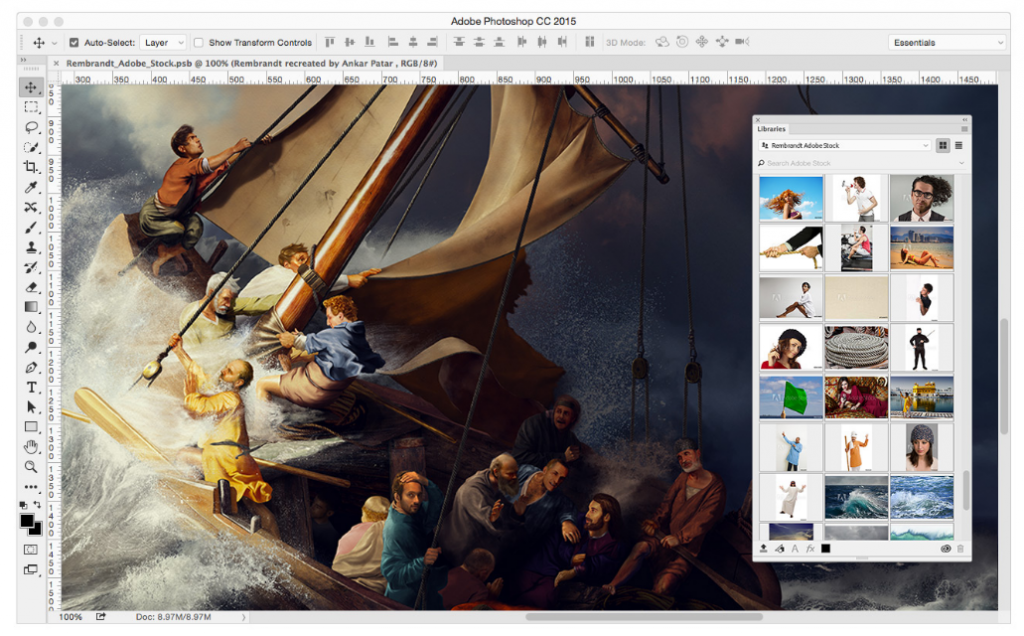
We’ve found that Adobe Stock seamlessly integrates with Creative Cloud applications, allowing users to access millions of assets directly within their preferred design tools. This integration streamlines the creative workflow, enabling designers to search, preview, and license images without leaving their workspace.
The Adobe Stock library includes:
- Professional photographs
- Vector illustrations
- Video footage
- 3D assets
- Templates
- Audio tracks
Adobe Stock offers flexible licensing options, catering to various project requirements and budgets. Users can choose from single image purchases, subscription plans, or enterprise solutions, making it accessible for individuals and organizations alike.
One of the standout features of Adobe Stock is its AI-powered search capability. This advanced technology allows users to find relevant images quickly by analyzing visual elements, concepts, and even emotions within the images.
While Adobe Stock provides premium content, it’s important to note that it’s not the only option in the market. Other platforms may offer alternatives, such as iStock (which sometimes provides promotional codes for discounts) or various sources for cheap stock photos. However, Adobe Stock’s integration with Creative Cloud and its vast, curated library make it a go-to choice for many creative professionals.
Key Features of Adobe Stock

Adobe Stock offers a comprehensive suite of features designed to enhance the creative workflow. Let’s explore the key elements that make Adobe Stock a preferred choice for many professionals and businesses.
Extensive Library of High-Quality Images
Adobe Stock boasts an impressive collection of over 200 million high-quality assets. This vast library includes:
- Professional photographs spanning various genres and styles
- Vector illustrations for scalable graphics
- Video footage in HD and 4K resolutions
- 3D assets for immersive design projects
- Templates for quick design solutions
- Audio tracks to complement visual content
The diversity and quality of Adobe Stock Images ensure that users find the perfect asset for their projects, regardless of industry or creative needs.
Integration with Adobe Creative Cloud
One of Adobe Stock’s standout features is its seamless integration with Creative Cloud applications. This integration offers:
- Direct access to Adobe Stock within popular design tools like Photoshop, Illustrator, and InDesign
- Ability to search, preview, and license assets without leaving the creative workspace
- Automatic syncing of licensed assets across Creative Cloud libraries
- Easy application of Adobe Stock Images to projects with a single click
This integration streamlines the creative process, saving time and enhancing productivity for designers and content creators.
Flexible Licensing Options
Adobe Stock provides versatile licensing options to accommodate various project requirements and budgets:
- Standard licenses for common usage scenarios
- Enhanced licenses for extended use and higher print runs
- Extended licenses for merchandise and templates
- Credit packs and subscription plans for cost-effective bulk purchases
These flexible options ensure that users can access the Adobe Stock Images they need while staying within their budget constraints.
How to Use Adobe Stock Images
Adobe Stock Images offers a user-friendly platform for accessing high-quality visual content. We’ll guide you through the process of finding and utilizing these assets for your projects.
Searching and Browsing the Library
Adobe Stock’s extensive library is easily navigable through its intuitive search interface. Users can enter keywords, phrases, or even upload images to find similar content. The AI-powered search analyzes visual elements and concepts, delivering relevant results quickly. Filters allow refining searches by image type, orientation, color, and more. Adobe Stock’s integration with Creative Cloud applications enables searching directly within design tools, streamlining the creative workflow.
Downloading and Licensing Images
Once you’ve found the perfect Adobe Stock image, downloading and licensing is straightforward:
- Preview the image in full resolution to ensure it meets your needs.
- Click the “License” button to purchase the image.
- Choose the appropriate license type based on your intended use.
- Download the high-resolution file directly to your device or Creative Cloud account.
Adobe Stock offers flexible licensing options, including standard and extended licenses. Users can purchase individual images or opt for subscription plans for cost-effective access to multiple assets. While Adobe Stock isn’t typically categorized as cheap stock photos, its integration with Creative Cloud and high-quality offerings provide excellent value for professional projects.
Pricing Plans and Subscription Options
Adobe Stock offers a range of pricing plans and subscription options to cater to various user needs and budgets. We’ll explore the different plans available, helping you choose the best option for your creative projects.
Monthly Subscriptions
Adobe Stock’s monthly subscriptions provide flexibility and cost-effectiveness for regular users:
- 10 images per month: $29.99
- 40 images per month: $79.99
- 350 images per month: $199.99
- 750 images per month: $249.99
These plans allow users to download a set number of standard assets each month, with unused downloads rolling over for up to a year.
Annual Subscriptions
For long-term users, annual subscriptions offer additional savings:
- 10 images per month (120 per year): $239.88/year
- 40 images per month (480 per year): $719.88/year
- 750 images per month (9000 per year): $2,399.88/year
Annual plans provide the same benefits as monthly subscriptions but at a discounted rate.
Credit Packs
For those who prefer a pay-as-you-go model, Adobe Stock offers credit packs:
- 5 credits: $49.95
- 16 credits: $149.95
- 40 credits: $349.95
- 80 credits: $599.95
Credits can be used to purchase individual assets, including standard and premium content.
Team and Enterprise Solutions
Adobe Stock also provides tailored solutions for businesses:
- Team plans: Starting at $79.99 per license per month
- Enterprise plans: Custom pricing based on organization needs
These plans offer additional features such as license management and increased download limits.
Licensing Options
Adobe Stock offers three main licensing types:
- Standard License: For most common uses
- Enhanced License: For higher-volume print runs and digital reproductions
- Extended License: For merchandise and templates for resale
Pricing varies based on the license type and asset category.
While Adobe Stock isn’t typically categorized as cheap stock photos, its integration with Creative Cloud and high-quality offerings provide excellent value for professional projects. Users can also take advantage of promotional offers and free trials to explore the platform before committing to a subscription.
Adobe Stock vs. Competitors
Adobe Stock faces stiff competition in the stock image market. We’ll compare Adobe Stock with two major competitors, Shutterstock and Getty Images, to highlight the strengths and weaknesses of each platform.
Comparison with Shutterstock
Adobe Stock and Shutterstock are both leading players in the stock image industry. While Adobe Stock offers seamless integration with Creative Cloud applications, Shutterstock boasts a larger library of over 350 million assets. Shutterstock’s pricing is generally more competitive, making it an attractive option for those seeking cheap stock photos. However, Adobe Stock’s AI-powered search capabilities and direct integration with design tools give it an edge in workflow efficiency for Creative Cloud users.
Comparison with Getty Images
Getty Images is known for its premium, high-quality content and editorial images. Unlike Adobe Stock, Getty Images offers exclusive rights-managed content, which can be crucial for certain projects. However, Adobe Stock’s royalty-free model and integration with Creative Cloud make it more accessible and cost-effective for everyday use. While Getty Images may be preferred for specific high-end or editorial needs, Adobe Stock Images provide a more versatile and user-friendly solution for a wide range of creative projects.
Pros and Cons of Adobe Stock
Adobe Stock offers a range of benefits and limitations for creative professionals and businesses. We’ve compiled a comprehensive list of the pros and cons to help you make an informed decision about using Adobe Stock Images for your projects.
Advantages of Adobe Stock
- Seamless integration: Adobe Stock’s direct integration with Creative Cloud applications streamlines workflow and enhances productivity.
- High-quality content: The library contains over 200 million professional-grade assets, including photos, vectors, videos, and 3D models.
- AI-powered search: Advanced search capabilities allow users to find relevant assets quickly and efficiently.
- Flexible licensing options: Various license types and subscription plans cater to different project needs and budgets.
- Diverse asset types: Users can access a wide range of content, including templates, audio tracks, and illustrations.
- Preview functionality: The ability to test watermarked images before purchase helps users make informed decisions.
- Regular content updates: New assets are added daily, ensuring a fresh and diverse selection.
- Contributor program: Creators can earn revenue by submitting their work to Adobe Stock.
- Cost: Compared to some competitors, Adobe Stock isn’t always the cheapest stock photo option available.
- Creative Cloud dependency: Full integration benefits are limited to Creative Cloud subscribers.
- Limited exclusive content: Unlike some premium services, Adobe Stock offers fewer exclusive or rights-managed images.
- Learning curve: New users may need time to navigate the platform and understand licensing options.
- Download limits: Some subscription plans have monthly download caps, which may restrict heavy users.
- No free tier: Unlike some competitors, Adobe Stock doesn’t offer a free image collection.
- Complex licensing terms: Understanding the different license types and their restrictions can be challenging for some users.
- Limited customization: Some assets may require additional editing to fit specific project needs.
By weighing these pros and cons, creative professionals can determine if Adobe Stock aligns with their specific needs and workflow requirements.
Tips for Maximizing Adobe Stock Images
Refine Your Search Techniques
Adobe Stock’s powerful search functionality is a key asset. We recommend using specific keywords, filters, and the AI-powered visual search to find the perfect images quickly. Combine multiple keywords for more precise results, and utilize the color filter to match your brand palette. The visual search feature allows us to upload an image and find similar options, saving time and ensuring consistency across projects.
Leverage Creative Cloud Integration
To maximize efficiency, we suggest taking full advantage of Adobe Stock’s integration with Creative Cloud applications. Access the Adobe Stock library directly within Photoshop, Illustrator, or InDesign to streamline your workflow. This integration allows us to preview watermarked images in our designs before purchasing, ensuring the perfect fit for our projects.
Explore Different Asset Types
Adobe Stock offers more than just photos. We encourage exploring vector illustrations, video footage, and 3D assets to add variety and depth to your projects. These diverse asset types can elevate your designs and provide unique visual solutions that stand out from competitors.
Utilize Collections and Libraries
Organize your Adobe Stock assets efficiently by creating collections and libraries. We find this particularly useful for team collaborations and maintaining consistency across projects. Share collections with team members to ensure everyone has access to approved assets, streamlining the creative process.
Understand Licensing Options
Familiarize yourself with Adobe Stock’s licensing options to make cost-effective decisions. We recommend assessing your project needs and choosing between standard, enhanced, or extended licenses accordingly. For frequent users, consider subscription plans or credit packs to optimize your budget while accessing high-quality Adobe Stock Images.
Stay Updated with Trends
Keep an eye on Adobe Stock’s curated collections and trend reports. We suggest exploring these regularly to stay informed about current visual trends and emerging styles. This knowledge can inspire fresh ideas and ensure our designs remain relevant and impactful.
Customize Stock Assets
Don’t hesitate to modify Adobe Stock assets to fit your specific needs. We often combine multiple images, adjust colors, or add custom elements to create unique visuals. This approach allows us to maximize the value of stock images while maintaining a distinct brand identity.
Conclusion
Adobe Stock Images stands as a powerful tool for creative professionals seeking high-quality visual content. We’ve explored its extensive library seamlessly integrated with Creative Cloud offering diverse assets and flexible licensing options. While it may not be the cheapest option it provides excellent value through its AI-powered search user-friendly interface and workflow efficiency. By leveraging Adobe Stock’s features and following our tips creative teams can elevate their projects and streamline their processes. As visual content continues to dominate the digital landscape Adobe Stock remains a valuable resource for those aiming to create impactful and engaging designs.